
Games worth discovering




How does the Speed Option works?
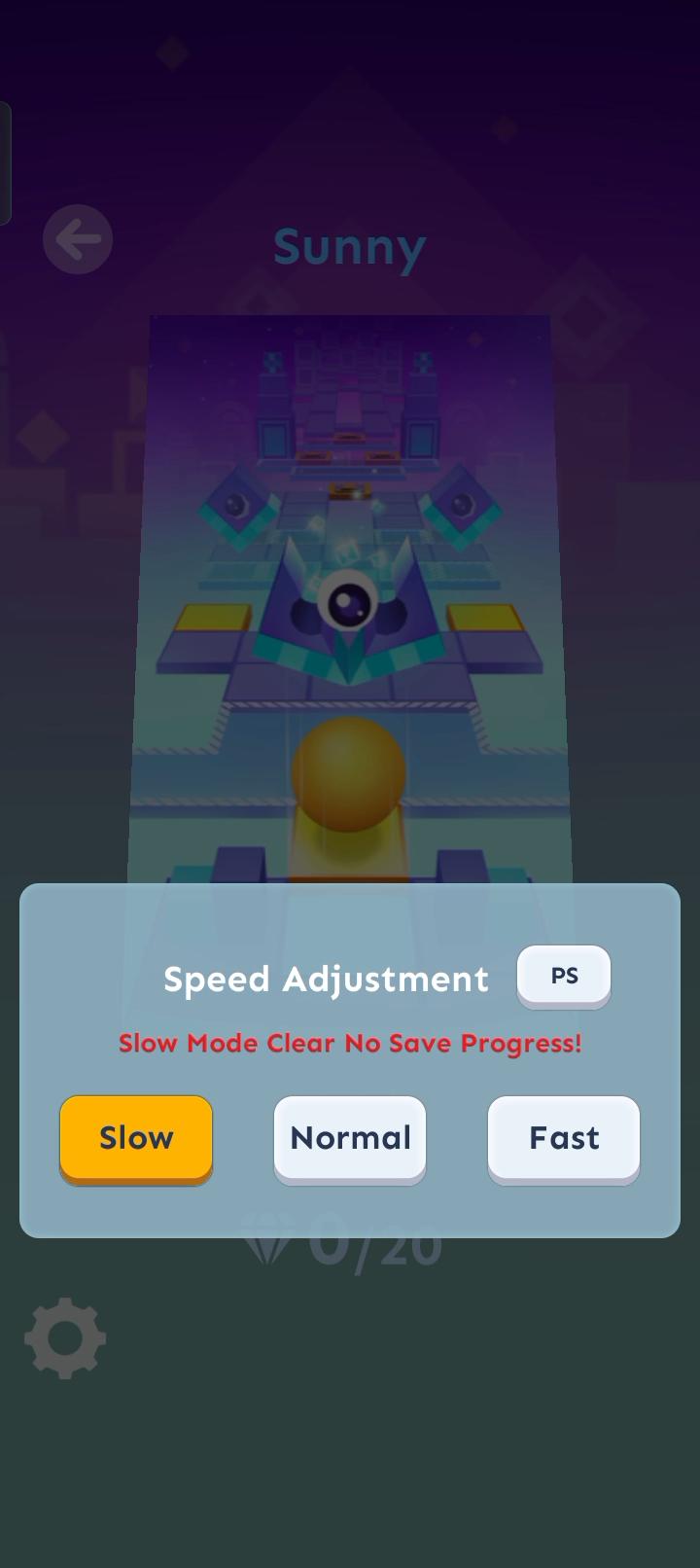
568 View2026-01-16Speed Adjustment is a feature that was introduced in Zone 22’s update. There is a button at the bottom right of the level title, which has a similar appearance to the Settings button. The button will allow you to access the three modes - Slow, Normal, and Fast. There is also a button at the top right of the speed menu with “PS” on it, which will slow you to change the pitch if you are on Slow or Fast mode.
Slow - The level will be slowed down, as well as the music. There are green letters at the top left corner of the screen saying “EZ”, meaning “easy”. If you complete the level or get to a new percentage, progress will not be saved, which is why when Slow mode is selected, there will be text at the top of the speed menu saying “Slow Mode Clear Save No Progress”. This means that the ball will actually go slow like a Snail
Normal - The level will be at its normal speed.
Fast - The level will be sped up, as well as the music. There are red letters at the top left corner of the screen saying “HR”, most likely meaning “hard”. This means that the ball moves faster like Sonic the Hedgehog!
Source: Fandom
Mentioned games


Comments
 View desktop site
TapTap looks better
on the app 






ok so I want a speed volume for now!
2026-02-04
Thanks
2026-02-01
rolling sky
2026-01-27